Hello @everybody,
Here’s what I’d like to achieve, just as I was able to do with Elementary OS 7.1 or Zorin 17 and 18.
I’m using Thunderbird 151.0.1. I have two laptops, each running several distributions.
To ensure my local files are always available, whether online or offline, on either computer, I use a USB stick. My USB stick is usually inserted before the computer boots up. I’d like it to mount automatically when the computer starts up so that I have access to my local files as soon as I open Thunderbird.
For consistency’s sake, I mount my USB stick in the /media/marc directory. In fact, the Zorin 17 interface shows the path to local files as:
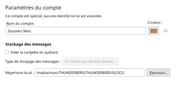
But what used to work with Zorin 17 & 18 and Budgie 24 no longer works with Budgie 26!
I don’t think this is down to Thunderbird (although what I’ve said about the distributions above only works because I use the Mozilla Thunderbird installation method on Linux; if I use Flatpak, it no longer works!
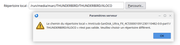
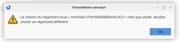
On Budgie 26.04, the path is different, which isn’t a problem in itself as long as you can choose a different directory. That’s what I’ve always done up until now, but now I’m getting an error message saying that the new directory is invalid!
And yet the path “/media/marc/THUNDERBIRD/THUNDERBIRD/XLOCO” DOES IN FACT EXIST!
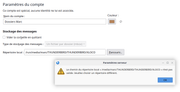
I do wonder what that /run is doing there!?
The permissions are the same in both cases 
To some people, it might seem odd that the paths are in uppercase; I know it’s not very orthodox, but a long time ago it was a way of distinguishing between directories more clearly… in my view. Besides, my other Thunderbird installations are set up this way and I don’t want to change everything (I have quite a few accounts and several distributions across two devices).
What puzzles me is that the paths aren’t greyed out when I select them, and it’s only at the end that things go wrong.
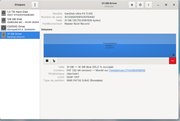
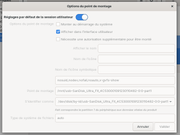
It mounts it in the right place without me even asking, and I can’t see what I could have fiddled with in the fstab to make it work!
I wanted to try editing the fstab:
Old
/dev/disk/by-id/usb-SanDisk_Ultra_Fit_4C530001091230110482-0:0-part1 /mnt/usb-SanDisk_Ultra_Fit_4C530001091230110482-0:0-part1 auto nosuid,nodev,nofail, x-gvfs-show 0 0
New
/dev/disk/by-id/usb-SanDisk_Ultra_Fit_4C530001091230110482-0:0-part1 /media/marc/THUNDERBIRD auto nosuid,nodev,nofail,x-gvfs-show 0 0
I do have the directory structure in my local files, but it’s in the wrong encoding, which seems to result in the folders being empty
The account settings are:
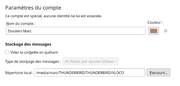

Something isn’t working properly, or I must have done something wrong!
I then deleted the fstab line that mounts the USB stick, and after restarting, I remounted it manually and noted down the path:
It is: /run/media/marc/THUNDERBIRD
And, as if by magic, my Thunderbird accepted this path; it struggled to process it at first, as it crashed on restart, but on the next attempt it worked with the correct encoding.
After looking into the “/run” directory (thanks @jlb), it turns out that this is a temporary directory located in RAM; it is automatically cleared when you log out. The mount is therefore neither automatic nor permanent.
I tried to set it to mount automatically on every distribution via Disks, without changing the path it suggested, but this did nothing to solve the problem:
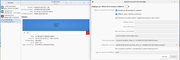
And then I changed the way I referred to the drive by replacing “by ID” with the drive’s number on the system: sdc1. I get the same result!
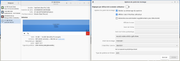
I’ve explored everything I know how to do. Perhaps someone has already looked into this problem and found a solution? Or maybe someone will come up with another idea whilst reading this (if they’ve had the patience to read this long post; it’s long because I don’t want to have to go through the same process all over again)?


